Saturday, August 9, 2014

USING DROID VPN ON MTN FREE 910MB


TO VIEW THE LIST OF SUBSCRIPTION CODESCLICK HERE
here are the lists of HTTP headers for different packages
PACKAGE HTTP HEADERS
JUMIA Host: jumia.com.ng%2f%3a0a
HELLOFOOD Host: hellofood.com.ng
JOVAGO Host: jovago.com.ng
CARMUDI Host: carmudi.com.ng
LAMUDI Host: lamudi.com.ng
KAYMU Host: kaymu.com.ng
EASITAXI Host: easitaxi.com.ng
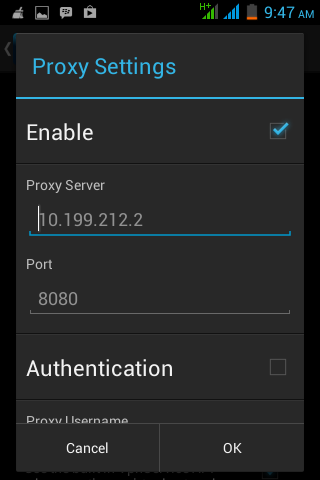
NEVER FORGET THAT HTTP PROXY IS 10.199.212.2 AND PORT 8080

Friday, August 8, 2014

HOW TO MTN NIGHT PLAN WORK DURING THE DAY updated 11-8-2014

Ūi

configure your VPN softwares using the image


for Simple server just edit the configura nand ot 
ensure that PHOST= '10.199.212.2
LPORT= '8080'
RPORT= '8080'
VALHDR0= 'facebook.com' 
IQUERY= 'facebook.com/home.php'
SUBSCRIBE TO MTN NIGHT PLAN BY DIALING *102# OR BY WRITING IN TEXT MESSAGE 102 AND SEND TO 131  and noe 0.facebook.com

Tuesday, August 5, 2014

screenshot OF TROID VPN working with MTN


pls always change the header to the type of the MB code u dial.
for example if i am using jumia code. i will change header to jumia.com.ng
but this is the working header for jumia presently jumia.com.ng%2f%3a0a this is the latest host....
this method also works with Droidvpn.

MTN FREE BROWSING USING TROIDVPN and DROID VPN, THE 710MB CODE METHODS


Step 1 download and install TroidVpn from playstore

step 2 Request each Daily , Weekly & Monthly plan by Direct USSD Codes Dialing [One after the other... 5MB , 25MB AND 100MB respectively each]

FOR DAILY 5MB USSD CODES

*662*6*1*1# for jumia
*662*6*2*1# for hellofood
*662*6*3*1# for jovago
*662*6*4*1# for carmudi
*662*6*5*1# for lamudi
*662*6*6*1*1# kaymu
*662*6*6*2*1# easitaxi


 FOR WEEKLY 25MB USSD CODES
*662*6*1*2# for jumia
*662*6*2*2# for hellofood
*662*6*3*2# for jovago
*662*6*4*2# for carmudi
*662*6*5*2# for lamudi
*662*6*6*1*2# kaymu
*662*6*6*2*2# easitaxi

 
FOR MONTHLY 100MB USSD CODES
*662*6*1*3# for jumia
*662*6*2*3# for hellofood
*662*6*3*3# for jovago
*662*6*4*3# for carmudi
*662*6*5*3# for lamudi
*662*6*6*1*3# kaymu
*662*6*6*2*3# easitaxi Please NB if u will be using Jumia codes please be consistent with it, and allow the Daily to finish before switching to weekly and monthly plans.
 

STEP 3 configure your TRoid VPN thus
SElect free server of your choice then R port 80, and L port 0
connection mode TCP,
go to advance settings


here are the list of hosts according to the platform
Host: jumia.com.ng%2f%3a0a
         hellofood.com.ng
         jovago.com.ng

etc....

and for any app or header that is using Iquery  just add /home.php
eg hellofood.com.ng/home.php

u can use VPN softwares... simple server and any app that supports TCP tunneling and HEADERS configuration.

LOOK AT THE SCREENSHOT AT THE ABOVE POST just edit only the Header Custom to any of the service you dial the code(that is if u subscribe to hello food, your custom headers will be hellofood.com.ng)

Monday, August 4, 2014

MODIFIED SETTINGS FOR MTN SIMPLE SERVER TO POWER JUMIA


PLEASE ONLY CHANGE THIS MAJOR PART IN YOUR SIMPLE SERVER CONFIGURATION SCRIPT.
OPEN WITH NOTEPAD AND EDIT DONT FORGET TO SAVE WHEN DONE WITH THE EDITING

HERE ARE THE MAJOR AREAS WHERE THERE ARE MODIFICATIONS
VALHDR0= and IQUERY=
JUST COMAPRE AND CONTRAST THE INFO BELOW WITH UR OWN CONFIGURATION SCRIPT
LHOST = '127.0.0.1'
IMETHOD = 0
ISPLIT = 0
RHTTP = 0
TIMEOUT = 60
PHOST = '10.199.212.2'
RQUERY = ''
RPATH = 0
PTYPE = 0
KEEP = ''
BQUERY = ''
MQUERY = ''
RHTTPS = 1
PPORT = 8080
LPORT = 8080
VALHDR0 = 'jumia.com.ng%2f%3aa'
VALHDR1 = ''
VALHDR2 = ''
VALHDR3 = ''
IQUERY = 'jumia.com.ng%2f%3aa/home.php'
ADMODE = 0
CQUERY = ''
CUSHDR2 = ''
CUSHDR3 = ''
CUSHDR0 = 'Host'
CUSHDR1 = ''
ILINE = 0
FQUERY = ''
SBUFF = 1024
RPORT = 0
You can copy and paste into notepad and save it.